
Table of Contents
Introduction
Bitlbee
Bitlbee is a messaging gateway with its initial release on 9 August 2002. It has been developed for over two decades; while I assume the current development is mostly maintenance, it's fully featured. It's also really awesome that such a niche software has been taken care of for such a long time.
Bitlbee works on your host the same as it does on a VPS. For demonstration, I will set it up on my localhost and then connect from my BlackBerry to my localhost to interact with Bitlbee. I also suggest doing the same to avoid the risk of leaking any information by accident and for security reasons. I will do a follow-up on how to self-host it on a cheap VPS or access it over a public instance in general.
IRC
Bitlbee itself is based on the Internet Relay Chat, better known as IRC. IRC was established in 1988, has its own history, and, although it has lost popularity over time, there are many ways, clients, and devices that are able to establish a connection to an IRC network.
XMPP
Now the last network introduced by Bitlbee is the eXtensible Messaging and Presence Protocol. To keep it short, XMPP is the backbone of the most well-known messaging platform, you guessed it, WhatsApp.
Example
Now let's set IRC, Bitlbee, XMPP, and your device in action to get a better understanding:

-
Your device will establish a connection to the gateway through IRC. In my case, my device is a BlackBerry Classic. I use Revolution IRC.
-
Connection established! Set up the service according to your needs. For demonstration, I am going to set up Discord and send some messages to [[https://discord.gg/JdWtYJ6PfM][Laundry Mat Linux Shack]]. The Discord service does not have native integration in Bitlbee; it's built on XMPP, as are many more plugins you will connect to in the near future.
-
Let's have fun and brag in front of people about having the same or similar feature parity as them. While I do maybe brag sometimes, it's very often a topic. A great way to shine with your geekiness and knowledge!
Demo
Prerequisites
Now here comes the part I have the most concerns about. While Bitlbee states they support almost every Linux distribution, I cannot guarantee the extent to which you may or may not face issues. Considering the project's age and that it is written in the C programming language, which is known for running on almost any device, I think it's unlikely you'll encounter issues.
Still, I suggest consulting your platform's wiki or, of course, the original wiki from Bitlbee.
If you still have issues or have specific questions, do not hesitate to send me a message!
Repology is another great way to check the availability on most relevant distros. As for bitlbee, it looks very promising, with up-to-date support for Arch, Fedora, and Debian/Ubuntu. We also have support for Alpine. Alpine Linux is always good to keep in mind, as it comes with very low resource usage, is utilized for many Docker images, and, if you own an Android phone, is the distribution powering Termux, which enables you to run Linux with its great advantages on your phone. And yes, of course, you could utilize your phone to host Bitlbee.
If you currently run Windows, I would take a look at WSL2.
I run NixOS, which offers native integration. Feel free to use the following configuration if you do too.
Discord
Taking a look at the wiki for Discord, you will realize there are two services for Discord. While the native service is not maintained anymore, the other one is supported through libpurple, which is basically XMPP. Bitlbee explains some more details about these types of services.
NixOS
{
  pkgs,
  ...
}:
{
  services.bitlbee = {
    enable = true;
    interface = "0.0.0.0";
    libpurple_plugins = [
      pkgs.pidginPackages.purple-discord
    ];
  };
  networking.firewall.allowedTCPPorts = [
    6667
  ];
}
Connecting to bitlbee
To connect to bitlbee you will need any IRC client. In this section I will use RevolutionIRC.
The following two images show how I configured RevolutionIRC to connect to my workstation:
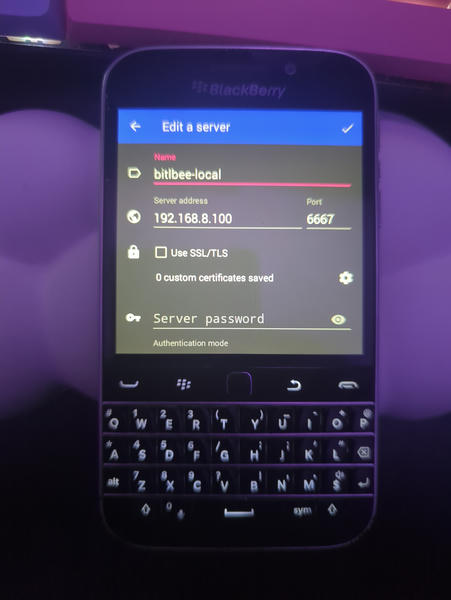
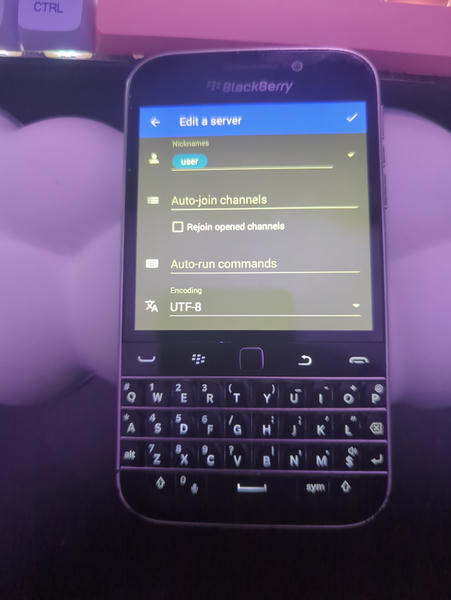
First setup
Bitlbee itself has a very extensive user guide. I will keep things short, show you the required commands, and explain what they do or what they are for. There is also this YouTube video which helped me a lot in the beginning.
It's also helpful to have another IRC client on your desktop alongside, as typing or copy-pasting text to and from the BlackBerry is often fiddly.
Once connected to the bitlbee network, you will need to register your user. Adjust mysecurepass to the password you would like.
register mysecurepass
Bitlbee will then log you in instantly. If you want to connect from another device with the same user, you will need to identify yourself with the following command:
identify user mysecurepass
Setting up your Discord account and connecting to it
-
Add your email to the
eionrobb-discordpluginaccount add eionrobb-discord your@email.com
-
Set your personal Discord token in bitlbee:
account eionrobb-discord set token your long token
Here is a short guide on how to get the token. Please be careful, as this token grants anyone full access to your Discord account.
-
Set your Discord password
account eionrobb-discord set password yourdiscordpass
-
Save your current configuration
save
-
Connect to Discord
account on
From here you should be good to go. Plugin-specific configuration can be found on the original purple-discord.
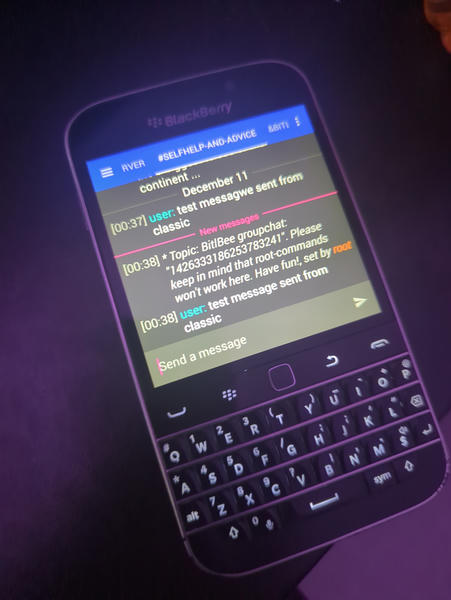
Here is a screenshot of how I sent a message to Discord from my BlackBerry Classic:
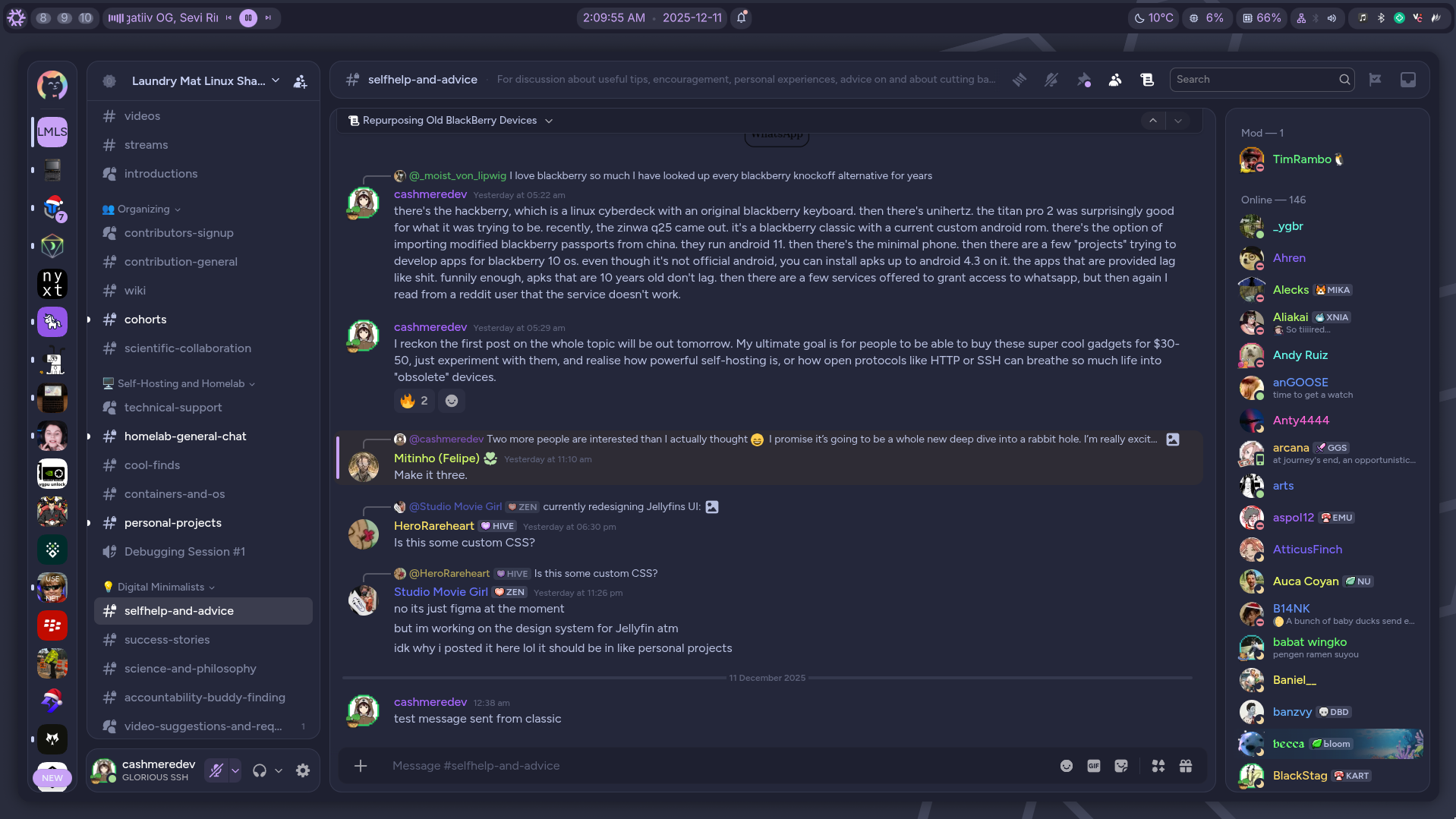
And that it was also visible from my Discord client on my workstation:
Further notices on bitlbee
Security
bitlbee was primarily developed as a messaging relay, with the intention of being able to handle many different users, but in such a way that bitlbee users cannot see each other's private messages and groups.
For example, user Bob can connect to bitlbee, and user Alice can too, at the same time.
However, Alice and Bob cannot communicate with each other via bitlbee itself.
bitlbee can run both locally on your computer and on a server. Running it locally is pretty self-explanatory, I think; your attack vector is relatively small.
I will also include this graphic in my guide. The connection from the IRC client running on your phone, e.g., a BlackBerry, can be made with or without a TLS/SSL connection. Personally, I've deployed bitlbee on one of my servers with TLS/SSL, and everything works great. You can also encrypt each individual chat separately so that the messages on the hard drive itself are unreadable to anyone but you. I haven't gone that far yet, though.
Configuring other plugins
Configuring other plugins, networks, and services follows a similar pattern. Once you get along with bitlbee, it's easy to add more networks. For example, I had never used the Discord plugin before, though it was somewhat straightforward to set it up.
"Caveats" of bitlbee
As bitlbee still relies heavily on IRC, sooner or later you may identify some hurdles introduced with IRC. I will add another follow-up on how to fix them and improve your whole experience.